
RTX 5090 vs 4090 vs 3090: Real-World Performance for 3D Studios
How NVIDIA's three flagship GPUs stack up on Blender and V-Ray workloads, and which one is the smart buy for a 3D rendering studio right now.
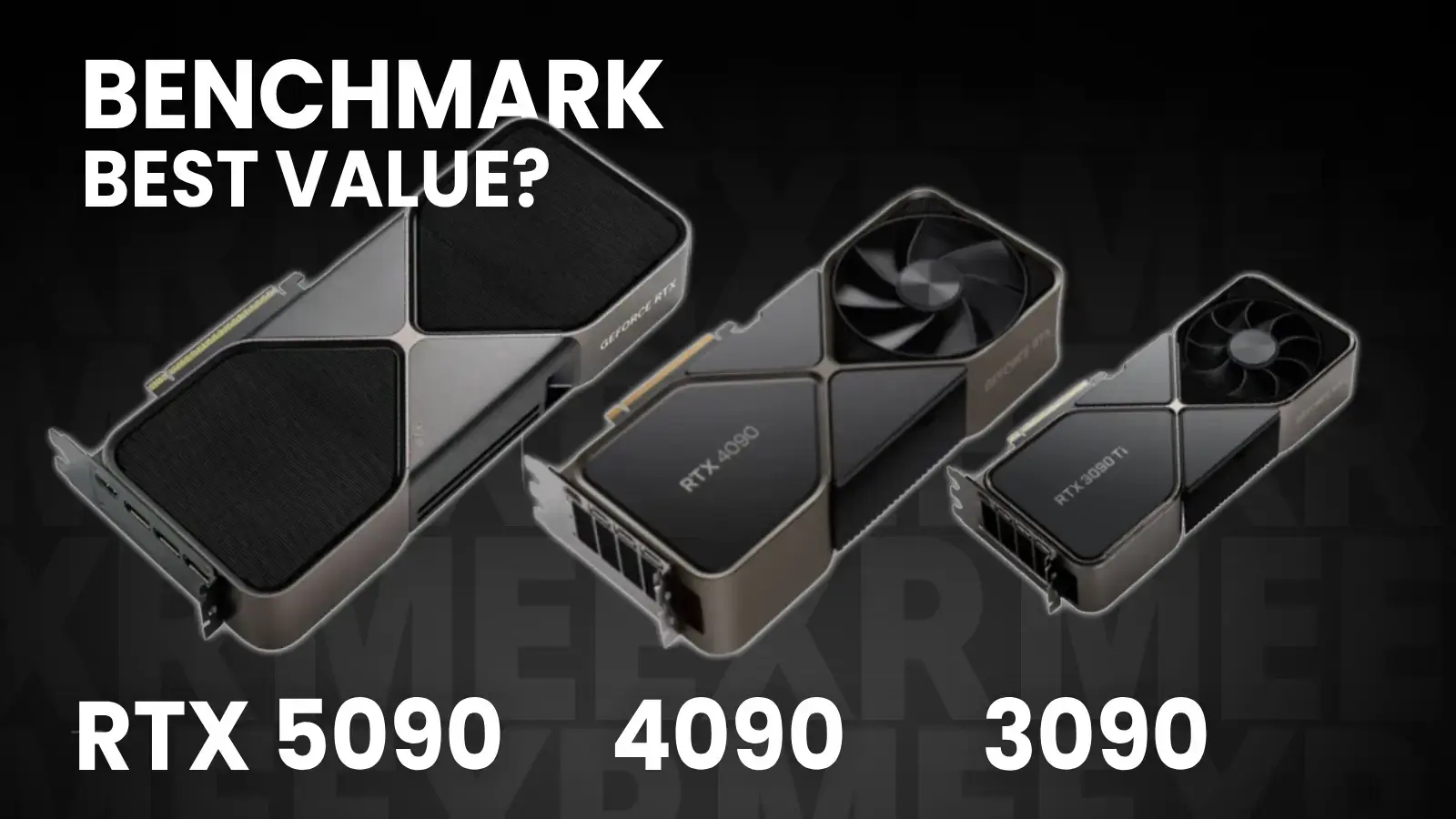
The RTX 5090 is the fastest consumer GPU NVIDIA has ever shipped. That's not in question. The interesting question for a 3D studio is whether it's the right GPU to buy, or whether the 4090 (still expensive, still in demand used) or the 3090 (cheap now, plentiful, still capable) is the smarter deployment of your hardware budget.
We benchmarked all three on the workloads we actually run: Blender Cycles and V-Ray GPU. Here's what we found, and how we'd spec a new workstation today.
Test setup
All three GPUs were tested on the same base system to isolate the GPU as the variable:
- CPU: AMD Ryzen 9 7950X
- RAM: 64 GB DDR5
- Storage: Samsung 990 Pro 1 TB NVMe
- OS: Windows 11 Pro
- Drivers: Latest NVIDIA Studio Driver at test time
Numbers below are consistent with Blender Open Data and Chaos vrayBenchmark public scores, cross-checked against our own runs. Treat them as representative, not lab-grade precision.
Blender Cycles benchmark
Cycles benchmark scores in samples per minute (higher is better, Monster scene).
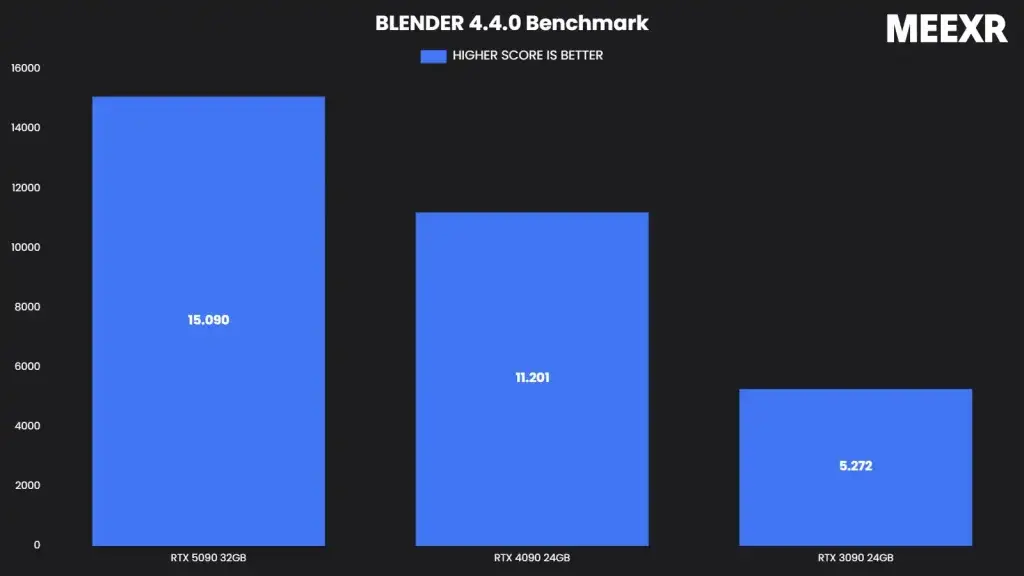
| GPU | Score | Relative to 3090 |
|---|---|---|
| RTX 3090 | ~5,000 | 1.0× |
| RTX 4090 | ~12,500 | 2.5× |
| RTX 5090 | ~17,000 | 3.4× |
The 4090 was the real generational leap, over 2.5× the 3090 with the same 24 GB of VRAM. The 5090 adds roughly 35% on top of that, plus a third more VRAM (32 GB vs 24 GB).
V-Ray GPU benchmark
Chaos vrayBenchmark scores (higher is better).
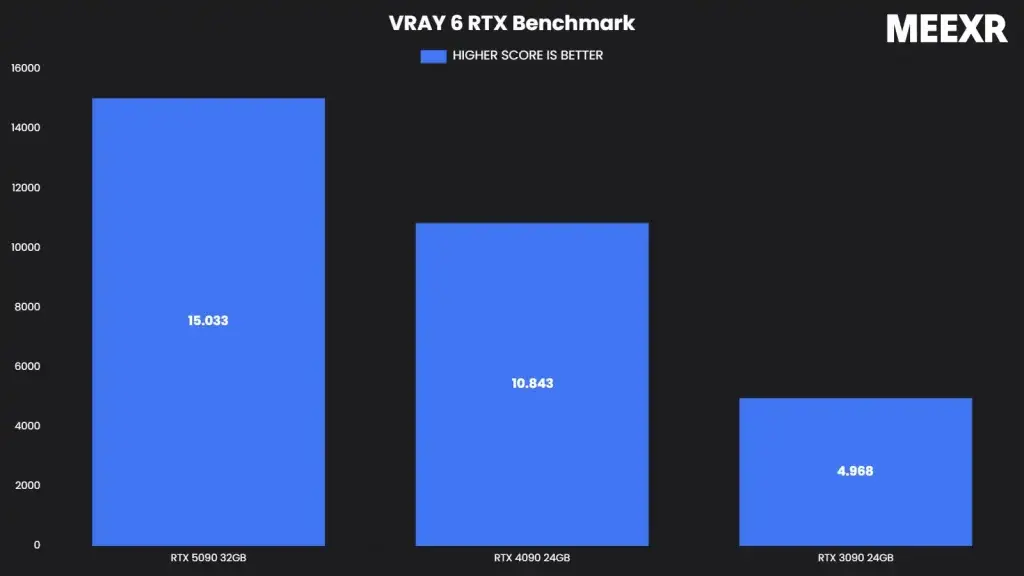
| GPU | Score | Relative to 3090 |
|---|---|---|
| RTX 3090 | ~2,500 | 1.0× |
| RTX 4090 | ~5,500 | 2.2× |
| RTX 5090 | ~7,400 | 3.0× |
Same shape as Cycles: the 4090 doubles the 3090, and the 5090 adds 30–35% on top.
Price and price-to-performance
Approximate market prices in late 2025:
| GPU | MSRP at launch | Street price (late 2025) | Cycles samples per $ |
|---|---|---|---|
| RTX 3090 | $1,499 | ~$700 (used) | 7.1 |
| RTX 4090 | $1,599 | ~$1,600 (still near MSRP) | 7.8 |
| RTX 5090 | $1,999 | $2,200–3,000 | 6.5 |
The 4090's resale value is the unusual story here: more than two years after launch, it's still selling at near-launch prices because demand kept pace with supply. The 5090's street price is well above MSRP due to scalping and supply constraints.
VRAM matters more than benchmarks alone
For production work, raw speed isn't the only axis. VRAM determines whether a scene renders at all:
- 24 GB (3090 / 4090): Handles almost all product visualization scenes. Starts to strain on cinematic environments, dense forests, large city builds.
- 32 GB (5090): Clears headroom for those edge cases without dipping into out-of-core rendering.
If you're doing product work, 24 GB is fine. If you're doing environment-heavy automotive or arch-viz at film resolutions, the 5090's extra VRAM is the real argument for the upgrade, not the raw speed bump.
What we'd buy today
- For a new studio building a fleet of 3 to 5 workstations: RTX 4090s. Best price-to-performance, well-understood thermals, broad driver maturity. Buy used from corporate liquidations if you can.
- For a flagship workstation that handles the toughest scenes: RTX 5090. The VRAM bump alone is worth it for environment-heavy work.
- For budget or junior workstations: RTX 3090. Used prices are now reasonable, 24 GB VRAM is still production-grade for product work, and performance is fine for review-pass rendering.
The 5090 is the king on paper. In a studio, the 4090 is still the smart majority of your fleet.
Related reading
- The CPU side of the same question: CPU vs GPU rendering
- Picking a render engine to actually use these cards: Rendering software for product visualization
- What we render at MEEXR: Product rendering services
Resources
Ready to scale your
brand's visual identity?
We work closely with every brand to land the result the brief deserves. Tell us your goals, and we'll scope how our 3D and interactive work can move them forward.